Owner Dashboard Documentation
Welcome to the Silicon Network Owner Dashboard documentation. This guide helps GPU NFT owners monitor their assets, track earnings, and manage their tokenized GPU portfolio.
What is the Owner Dashboard?
The Owner Dashboard is your control center for managing GPU NFT ownership on Silicon Network. It enables you to:
- Monitor earnings from your GPU assets in real-time
- Track performance of individual GPUs and your overall portfolio
- Manage agreements with datacenter providers
- Withdraw funds to your wallet when ready
- Analyze returns and project future performance
- List GPUs for sale on the secondary market
- View network metrics and compare your performance
Who is this for?
This documentation is designed for GPU NFT owners who:
- Own tokenized GPU infrastructure through Silicon Network
- Receive earnings from GPU compute rentals
- Want to maximize returns on their GPU assets
- Need to understand their portfolio performance
Getting Started
If you're new to the Owner Dashboard, we recommend:
- Read the Dashboard overview to understand your main metrics
- Check My GPUs to see your complete portfolio
- Review Financials to understand your earnings
- Explore the Calculator to project returns
Quick Navigation
Core Pages
- Dashboard - Overview and key metrics
- My GPUs - Complete GPU inventory and management
- Trades - Secondary market trading
- Financials - Earnings and transaction history
- Calculator - Return projection tools
- Network - Silicon Network metrics and benchmarks
- Settings - Account configuration
Common Tasks
- Check daily earnings
- Sign provider agreements
- Withdraw available balance
- Monitor GPU performance
- Compare to network averages
- Project future returns
- List GPU for sale
Understanding Your Role
As a GPU owner on Silicon Network:
You own:
- NFT representing physical GPU hardware
- Rights to earnings from GPU rentals
- Ability to sell GPU NFT on secondary market
You don't manage:
- Physical hardware operations
- Datacenter infrastructure
- Rental customer relationships
- Compute workload deployment
Your datacenter provider handles:
- Hardware hosting and maintenance
- Rental facilitation
- Earnings calculation and distribution
- Operational compliance
Key Concepts
Tokenized Ownership
Your GPU NFT represents ownership of physical hardware hosted in professional datacenters. You receive earnings when your GPU is rented for AI compute workloads.
Earning Flow
- Compute customer rents your GPU
- Usage is metered and recorded
- Earnings calculated based on rental
- Amount appears in "Queued earnings"
- Processed to "Balance" during payout cycle
- You withdraw to your wallet
Agreements
Datacenter providers require signed agreements before GPUs can generate earnings. These define operational terms and payment structures.
Multi-chain NFTs
Silicon Network offers multi-chain NFT support to provide GPU access to as many blockchain ecosystems as possible. This approach ensures broader accessibility and enables ownership across different chains, including Chia and Base, with plans to expand to additional networks.
Dashboard Overview
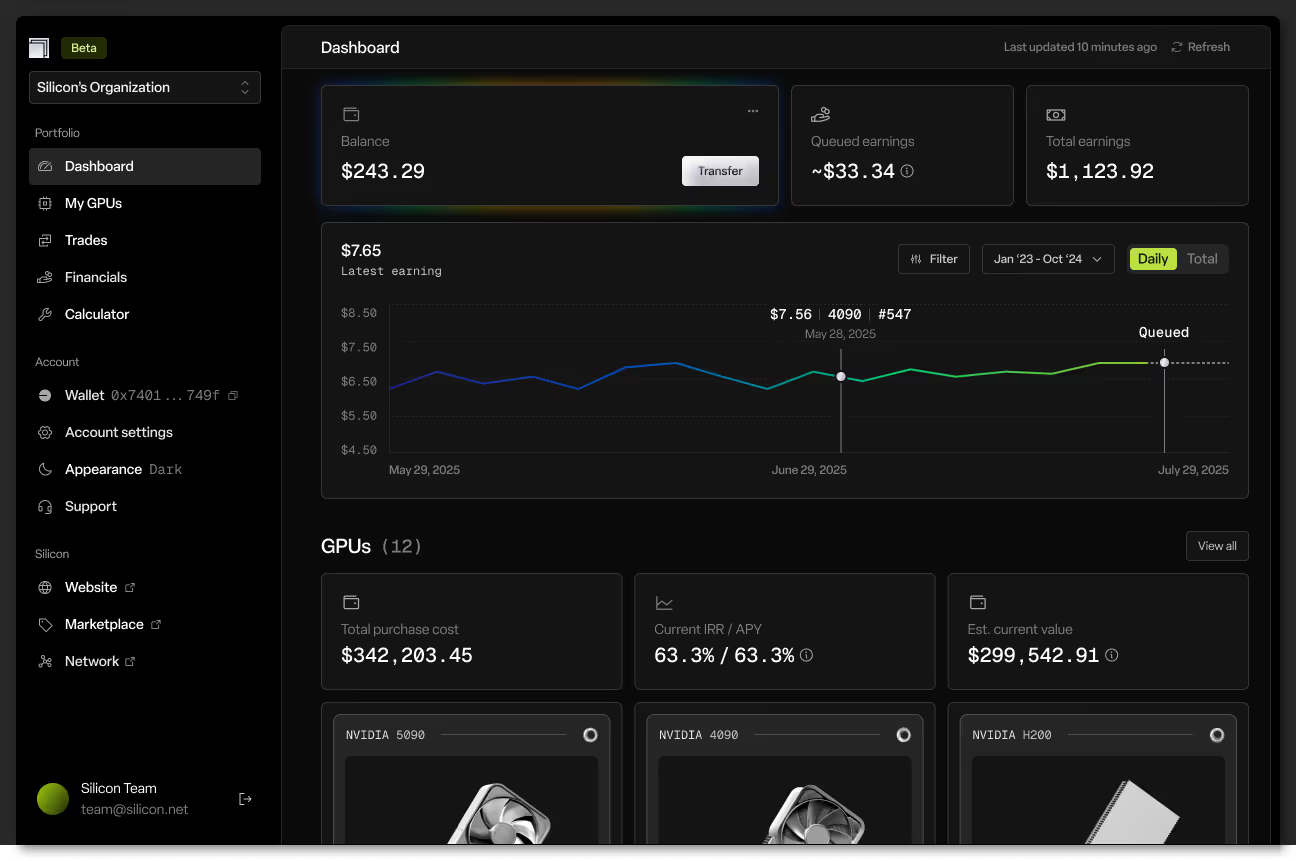
Main Metrics
- Balance: Available earnings ready to withdraw
- Queued Earnings: Pending amounts being processed
- Total Earnings: Lifetime cumulative revenue
- IRR/APY: Portfolio return performance
- Est. Current Value: Estimated resale value
Portfolio View
See all your GPUs grouped by type with quick performance metrics and navigation to detailed views.
Earnings Visualization
Track daily earning trends, identify patterns, and monitor portfolio health through interactive charts.
Support
If you need assistance:
- Check the relevant page documentation
- Review Troubleshooting for common issues
- Contact your datacenter provider for hardware/operational questions
- Reach out to support@silicon.net for platform issues
Important Disclaimers
Past performance does not predict future results. GPU earnings vary based on market demand for compute, hardware depreciates over time, provider performance may vary, and secondary market prices fluctuate. Your GPU NFTs represent ownership of physical infrastructure commodities, not investment securities.
Ready to dive in? Start with the Dashboard to understand your portfolio overview, or jump to My GPUs to see your complete asset list.