Provider Dashboard Documentation
Welcome to the Silicon Network Provider Dashboard documentation. This guide helps datacenter providers manage GPU infrastructure, track operations, and facilitate tokenized GPU ownership.
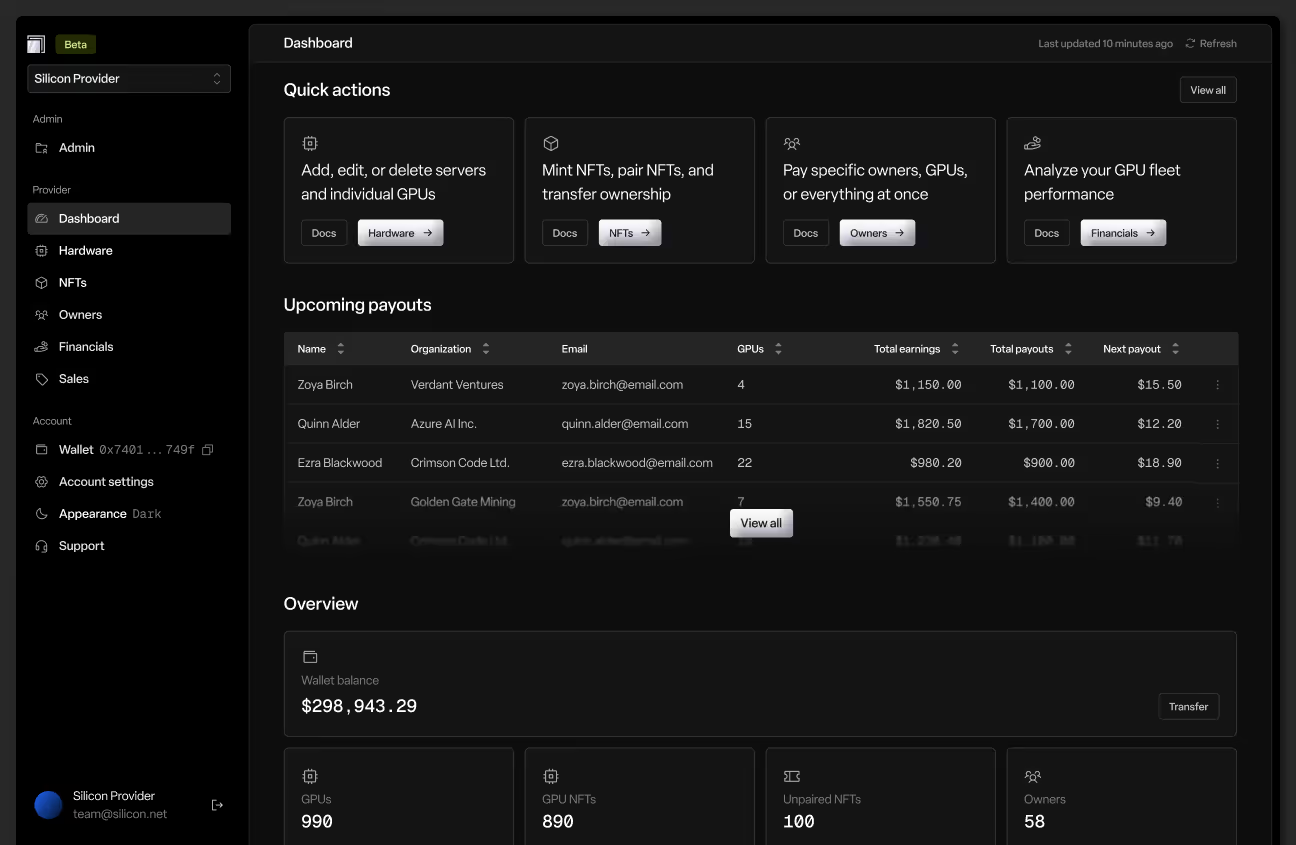
What is the Provider Dashboard?
The Provider Dashboard is your operational control center for managing GPU infrastructure on Silicon Network. It enables you to:
- Import and sync GPU hardware from major cloud platforms
- Mint and manage NFTs representing physical GPU assets
- Pair GPUs with NFTs to activate earning capabilities
- Monitor operations with real-time alerts and health metrics
- Track financials for owners and your datacenter operations
- Facilitate payments to GPU NFT owners
- Manage relationships with multiple GPU owners
- Maintain compliance with provider agreements
Who is this for?
This documentation is designed for datacenter providers who:
- Operate GPU infrastructure in professional datacenters
- Host tokenized GPUs for Silicon Network NFT owners
- Facilitate GPU rentals to compute customers
- Distribute earnings to GPU NFT owners
- Manage multi-owner GPU portfolios
Getting Started
If you're new to the Provider Dashboard, we recommend:
- Read the Dashboard overview to understand key alerts and metrics
- Review Hardware to import and manage your GPU inventory
- Explore NFTs to understand minting and pairing workflows
- Check Owners to manage owner relationships
- Study Financials for earnings tracking and payouts
Quick Navigation
Core Pages
- Home - Welcome and quick start
- Dashboard - Operational health and alerts
- Hardware - GPU and server inventory management
- NFTs - Mint and manage tokenized GPU assets
- Owners - Owner relationships and agreements
- Financials - Earnings tracking and payment processing
- Settings - Provider configuration and preferences
Essential Guides
- Importing Hardware - Connect vendor platforms and sync GPUs
- Minting NFTs (Paired) - Create NFTs and immediately pair with GPUs
- Minting NFTs (Unpaired) - Create NFTs for future GPU assignment
- Pairing NFTs - Connect existing NFTs to physical GPUs
- Paying Owners - Process payouts to NFT holders
- Monitoring Financials - Track earnings and operations
Understanding Your Role
As a datacenter provider on Silicon Network:
You manage:
- Physical GPU hardware and datacenter infrastructure
- Vendor platform integrations (RunPod, Vast, Akash, etc.)
- GPU-to-NFT pairing operations
- Earning calculations and distribution to owners
- Operational compliance and uptime
- Owner communications and support
You facilitate:
- GPU rentals to compute customers
- NFT minting and transfers to buyers
- Regular payouts to GPU NFT owners
- Secondary market sales between owners
- Agreement signing and renewal
You don't control:
- NFT ownership (determined by blockchain)
- Owner's ability to sell their GPUs
- Secondary market pricing
- Owner's withdrawal timing
GPU owners handle:
- NFT ownership and transfers
- Secondary market sales decisions
- Earnings withdrawal to their wallets
- Portfolio management
Key Concepts
Tokenized GPU Infrastructure
Silicon Network enables fractional ownership of GPU infrastructure through NFTs. Each NFT represents one physical GPU unit hosted in your datacenter. Owners receive earnings while you maintain operational control.
Hardware Syncing
Connect your vendor platforms (RunPod, Vast, Akash, TensorDock, Shadeform) to automatically import GPU data, track earnings, and sync operational status. Manual imports are also supported via CSV.
Minting and Pairing
Minting creates the NFT on the blockchain. Pairing connects that NFT to a specific physical GPU in your inventory. GPUs must be paired to generate earnings for owners.
Two workflows:
- Paired Minting: Mint NFT and immediately assign to a GPU (recommended for direct sales)
- Unpaired Minting: Mint NFT first, pair to GPU later (useful for pre-sales or flexible inventory)
Multi-chain NFT Support
Silicon Network offers multi-chain NFT support to provide GPU access to as many blockchain ecosystems as possible. This approach ensures broader accessibility and enables ownership across different chains, including Base and Chia, with plans to expand to additional networks.
Provider Agreements
Owners must sign your provider agreement before GPUs can generate earnings. These agreements define:
- Operational terms and responsibilities
- Payout schedules and calculation methods
- Hardware maintenance expectations
- Termination conditions
Earnings Flow
- GPU rented: Compute customer uses GPU capacity
- Usage metered: Your vendor platform tracks rental time/resources
- Data synced: Silicon imports earning data from vendor
- Owner credited: Earning appears in owner's "Queued earnings"
- Processed: Moved to owner's "Balance" during payout cycle
- Paid out: You transfer earnings to owner's wallet
- Owner withdraws: Owner moves funds from platform to personal wallet
Payout Responsibility
As the provider, you're responsible for:
- Monitoring pending payouts in the Financials page
- Initiating transfers to owners' wallets on schedule
- Maintaining sufficient USDC liquidity for payouts
- Tracking payout history and confirmations
Dashboard Overview
Active Alerts
The dashboard prominently shows critical operational issues:
GPUs Not Collecting Earnings: Identifies GPUs that haven't reported earnings recently. May indicate sync failures, offline hardware, unpairing issues, or vendor platform problems.
Action Required: Click "View GPUs" to see affected hardware and investigate root cause.
GPU Inventory Summary
Quick count of total GPUs by model type (H100, RTX 4090, etc.) across your entire operation.
Navigation Hub
Central access point to all provider functions: Hardware management, NFT operations, Owner relationships, Financial tracking, and Settings configuration.
Common Workflows
Initial Setup (New Provider)
- Configure your provider account in Settings
- Add vendor integrations (RunPod, Vast, etc.)
- Wait for initial hardware sync to complete
- Review imported servers and GPUs in Hardware
- Activate servers that will host tokenized GPUs
- Create and publish your provider agreement
- Mint NFTs for available GPUs (paired or unpaired)
- Transfer NFTs to initial buyers
- Wait for owners to sign agreements
- Monitor Dashboard for operational alerts
Daily Operations
Morning check (5 minutes):
- Open Dashboard and review alerts
- Check for GPUs not collecting earnings
- Investigate and resolve any sync issues
- Verify no pending agreement approvals
Weekly tasks (30 minutes):
- Review Financials for pending payouts
- Process payments to owners on schedule
- Check vendor sync status in Hardware > Settings
- Monitor owner communications and questions
- Verify GPU utilization rates
Monthly responsibilities (1-2 hours):
- Reconcile all owner payouts
- Review and optimize vendor integrations
- Audit GPU inventory and pairing status
- Check for unutilized or underperforming hardware
- Review provider metrics and KPIs
Onboarding a New Owner
- Owner purchases GPU NFT from you or secondary market
- Owner's wallet address appears in Owners page
- Owner receives prompt to sign your provider agreement
- You receive notification when agreement is signed
- Verify GPU is properly paired to NFT
- Confirm GPU begins generating earnings
- Monitor earnings flow to owner's balance
Processing Payouts
- Navigate to Financials > Owners tab
- Review pending payouts by owner
- Click "Pay" on individual owner or bulk process
- Confirm transaction details and amounts
- Sign blockchain transaction to transfer USDC
- Wait for confirmation
- Payout marked as complete in system
- Owner can now withdraw to personal wallet
Handling GPU Sales (Owner-to-Owner)
When an owner lists a GPU on the secondary market:
- GPU remains operational and earning (no action needed)
- Sale executes between owner wallets
- New owner automatically appears in your Owners list
- New owner must sign your provider agreement
- Verify pairing remains intact after sale
- Earnings automatically route to new owner
Minting New NFTs
For immediate pairing (most common):
- Navigate to Hardware > GPUs tab
- Find unpaired GPU in inventory
- Click three dots menu > "Mint NFT"
- Select "Paired" minting option
- Choose blockchain (Base or Chia)
- Confirm transaction
- NFT minted and immediately paired to GPU
- Transfer NFT to buyer
For future pairing (bulk minting):
- Navigate to NFTs page
- Click "Mint NFTs"
- Select quantity and GPU type
- Choose blockchain
- Confirm batch minting transaction
- NFTs created in your wallet
- Pair to specific GPUs later as needed
Hardware Management
Vendor Integrations
Silicon supports automatic syncing from:
- RunPod: GPU cloud platform
- Vast.ai: Distributed GPU marketplace
- Akash Network: Decentralized cloud compute
- TensorDock: GPU infrastructure provider
- Shadeform: Multi-cloud GPU aggregator
Each integration requires API credentials and sync configuration. See Importing Hardware for setup instructions.
Sync Monitoring
Hardware syncs run automatically on a schedule (typically hourly). Monitor sync status in Hardware > Settings > Vendors. Failed syncs trigger dashboard alerts and require investigation.
Common sync issues:
- API credentials expired or invalid
- Vendor platform downtime
- Rate limiting or throttling
- Network connectivity problems
Server Activation
Control which servers participate in the tokenization program. Inactive servers and their GPUs won't appear in pairing workflows or generate earnings. Deactivating a server automatically unpairs all its GPUs.
NFT Operations
Token ID Management
Every GPU NFT has a unique Token ID. Track Token IDs in the NFTs page and cross-reference with GPUs in the Hardware page. Token IDs appear on owner dashboards and blockchain explorers.
Pairing Status
GPUs can be:
- Unpaired: No NFT assigned (cannot generate owner earnings)
- Paired: Connected to specific NFT (earns for owner)
- Transferred: NFT moved to new owner (pairing maintained)
Multi-chain Considerations
NFTs can be minted on Base or Chia networks. Each has different characteristics:
- Base: EVM-compatible, faster finality, broader DeFi integration
- Chia: Offer-based trading, lower fees, unique ownership model
Choose based on buyer preference and market liquidity.
Owner Management
Agreement Status
Track which owners have signed your provider agreement. Unsigned agreements block earnings—follow up with owners to complete this step.
Communication
Maintain clear communication with owners about:
- Payout schedules and timing
- Downtime or maintenance windows
- Hardware upgrades or replacements
- Performance issues or concerns
- Policy changes or updates
Performance Tracking
Owners monitor their GPU performance daily. Proactive communication about issues builds trust and reduces support burden.
Financial Operations
Earnings Calculation
Earnings are calculated based on:
- Actual GPU rental time and usage
- Vendor platform pricing and customer payments
- Your provider fee structure (defined in agreements)
- Any promotional adjustments or bonuses
Payout Processing
Best practices:
- Process payouts on a consistent schedule
- Maintain sufficient USDC reserves
- Batch process payments for efficiency
- Confirm transactions on blockchain
- Respond to owner payout inquiries promptly
Financial Reporting
The Financials page provides:
- Total earnings across all owners
- Pending payouts by owner
- Payout history and confirmations
- Revenue trends and analytics
- Export capabilities for accounting
Troubleshooting
For common provider issues, see:
- Provider Troubleshooting - Comprehensive problem-solving guide
- Best Practices - Operational excellence tips
- Vendor-specific documentation for platform issues
Quick fixes:
- GPUs not syncing: Check API credentials and vendor platform status
- Earnings not appearing: Verify GPU pairing and agreement status
- Payout failures: Confirm USDC balance and wallet connectivity
- Owner can't withdraw: Check that payout was processed and confirmed
Support
If you need assistance:
- Review the relevant page documentation
- Check Troubleshooting for common issues
- Consult Guides for step-by-step walkthroughs
- Contact vendor support for platform-specific problems
- Reach out to provider-support@silicon.net for platform issues
Best Practices
Operational Excellence:
- Monitor Dashboard alerts daily
- Process payouts consistently and on time
- Maintain vendor sync health
- Respond to owner communications promptly
- Document your internal procedures
Hardware Management:
- Keep vendor integrations active and updated
- Audit GPU inventory regularly
- Maintain spare capacity for replacements
- Plan for hardware depreciation
- Track utilization and performance
Owner Relations:
- Set clear expectations in agreements
- Communicate proactively about issues
- Process payouts reliably
- Provide responsive support
- Build trust through transparency
Financial Hygiene:
- Maintain adequate USDC liquidity
- Reconcile payouts monthly
- Track revenue and costs accurately
- Plan for seasonal demand variations
- Optimize fee structures
Important Disclaimers
As a provider, you're responsible for:
- Operational uptime and hardware maintenance
- Accurate earnings calculation and reporting
- Timely payouts to owners
- Compliance with agreements and regulations
- Data security and privacy
Silicon Network provides the platform and infrastructure, but you maintain operational control and responsibility for your datacenter and GPU fleet.
Ready to dive in? Start with the Dashboard to monitor your operations, or jump to Hardware to begin importing your GPU inventory.